
Installation
SkyPort ships as a Go CLI named skyport, plus a separate backend server binary built from backend/.
Minimum System Requirements
SkyPort works on lightweight systems, but the recommended minimums are:
- 1 vCPU core
- 512 MB RAM
- 2 GB RAM+ recommended for Docker-based setups
Linux
Use the release binary or build from source.
root or with sudo.sudo su
curl -fsSL https://skyport.akashhalder.in/installer.sh | sudo bash
skyport --version
# Setup Systemd in Production/Linux Environments
skyport service install
skyport service start
# Start The Web UI:
skyport start webui
git clone https://github.com/Nil369/SkyPort.git
cd SkyPort
# Make sure you have make installed on your system!
make cli-build
make backend-build
sudo install -m 0755 bin/cli/linux-amd64/skyport /usr/local/bin/skyport
sudo install -m 0755 bin/server/linux-amd64/skyport-server /usr/local/bin/skyport-server
Linux notes
skyportmust be on yourPATH.skyport start webuiexpects a backend binary such asskyport-serverorskyport-backendonPATH, or a custom path passed with--binary.- If you hit permission errors, verify the binary mode and Docker socket permissions.
which skyport
ls -la /usr/local/bin/skyport
- Installation Locations:
/opt/skyport
/usr/local/bin/skyport
/usr/local/bin/skyport-server
Windows
To Install the CLI binary and the Backend Server binary, then add its folder to PATH.
Powershell / GitBash / Terminal as AdminSimply Search "Terminal/GitBash/Powershell" in Windows Searchbar and then Run as Adminstrator
| In Search Bar | Using Terminal Tab |
|---|---|
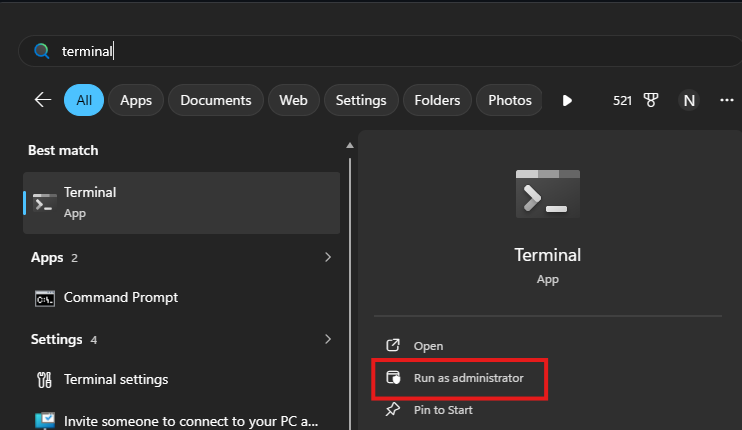 | 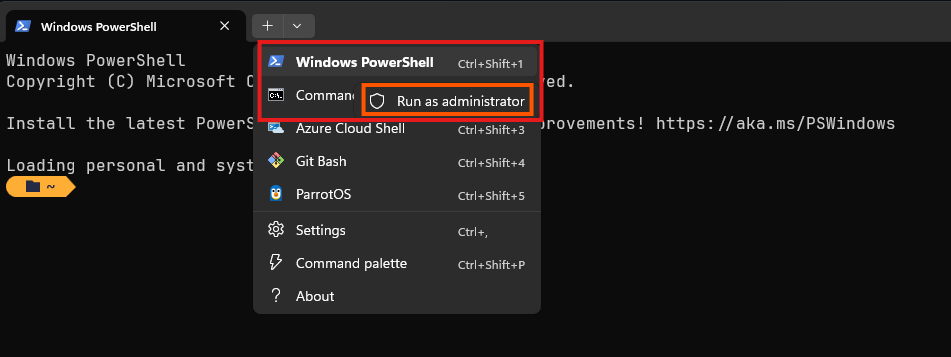 |
irm https://skyport.akashhalder.in/installer.ps1 | iex
skyport --version
# Start The Backend Server:
skyport start server
# Start The Web UI:
skyport start webui
curl -fsSL https://skyport.akashhalder.in/installer.ps1 | powershell -Command -
skyport --version
# Start The Backend Server:
skyport start server
# Start The Web UI:
skyport start webui
git clone https://github.com/Nil369/SkyPort.git
cd SkyPort
# Make sure you have "make" installed on your system!
make cli-build
make backend-build
Windows PATH Setup - Manual Method
Windows:C:\Program Files\SkyPort
After installing SkyPort, the skyport command should work globally from PowerShell or Command Prompt.
If the command is not recognized, manually add SkyPort to your Windows PATH. Expand the Show Properties to see the Step!
Steps
Open Start Menu → search for Environment Variables
Open Edit the system environment variables
Click Environment Variables
Under User variables or System variables, select Path
Click Edit
Add:
C:\Program Files\SkyPort
Click OK and restart your terminal.
Verify Installation:
skyport --version
If installed correctly, SkyPort will print the current version.
Managing the SkyPort Backend Server
During installation, SkyPort automatically start the backend server in the background.
Terminal / Powershell / GitBashStop the Server
skyport stop # Using the latest Skyport CLI
taskkill /IM skyport-server.exe /F
Start the Server Again
skyport start server # Using the latest Skyport CLI, OR,
skyport start # OR,
skyport restart
Start-Process "C:\Program Files\SkyPort\skyport-server.exe"
# This command may open a new powershell tab. Don't Panic, Its Ok!
# You can always Stop the server by Pressing "CTRL + C"
Check if the Server is Running
skyport status # Using the latest Skyport CLI
Get-Process skyport-server
The backend server powers the SkyPort Web UI, API, Docker management, PM2 integration, monitoring system, and other infrastructure services.
macOS
root or with sudo.sudo su
curl -fsSL https://skyport.akashhalder.in/installer.sh | sudo bash
skyport --version
# Setup Systemd in Production/Linux Environments
skyport service install
skyport service start
# Start The Web UI:
skyport start webui
macOS notes
- The first run may trigger a Gatekeeper prompt.
- If the shell cannot find
skyport, confirm/usr/local/binis onPATH. - Installation Locations:
/usr/local/skyport
/usr/local/bin/skyport
/usr/local/bin/skyport-server
WSL
WSL behaves like Linux, but Docker access depends on your Windows-side Docker setup.
sudo su

curl -fsSL https://skyport.akashhalder.in/installer.sh | sudo bash
skyport --version

# Setup Systemd in Production/Linux Environments
skyport service install
skyport service start

# Start The Web UI:
skyport start webui
git clone https://github.com/Nil369/SkyPort.git
cd SkyPort
# Make sure you have make installed on your system!
make cli-build
make backend-build
WSL networking notes
skyport start webuiwill usually bind to0.0.0.0on Linux and show the detected LAN IP.- If you are running Docker Desktop on Windows, make sure WSL integration is enabled.
- If you access the UI from the Windows host, use the address printed by
skyport start webui. - WSL Installation Locations:
/opt/skyport
/usr/local/bin/skyport
/usr/local/bin/skyport-server
Troubleshooting
Command not found
which skyport
echo $PATH
Permission denied
chmod +x /usr/local/bin/skyport
ls -la /usr/local/bin/skyport
Docker socket access
ls -la /var/run/docker.sock
sudo usermod -aG docker $USER
newgrp docker
Build from source fails
Use the repository root targets rather than building only a partial package:
make frontend-build
make backend-build
make cli-build
UnInstalling SkyPort
Remove SkyPort binaries, configuration, and optional data directories from your system.
Linux
root or with sudo.sudo su
curl -fsSL https://skyport.akashhalder.in/uninstaller.sh | sudo bash
sudo su

# Remove SkyPort including all data, workspace files, and database
curl -fsSL https://skyport.akashhalder.in/uninstaller.sh | sudo SKYPORT_PURGE_DATA=1 bash
What gets removed?
The Linux uninstaller removes:
/usr/local/bin/skyport
/usr/local/bin/skyport-server
/etc/skyport
/etc/systemd/system/skyport.service
If SKYPORT_PURGE_DATA=1 is used, it also removes:
/opt/skyport
Linux Service Cleanup
The uninstaller automatically:
- Stops the
skyportsystemd service - Disables auto-start on boot
- Reloads the systemd daemon
- Removes the service definition
Verify Removal
which skyport
systemctl status skyport
If successfully removed:
which skyportshould return nothingsystemctl status skyportshould report service not found
Windows
SkyPort for Windows installs into:
C:\Program Files\SkyPort
PowerShell as Administrator before uninstalling.irm https://skyport.akashhalder.in/uninstaller.ps1 | iex
curl -fsSL https://skyport.akashhalder.in/uninstaller.ps1 | powershell -Command -
What gets removed?
C:\Program Files\SkyPort
Including:
skyport.exe
skyport-server.exe
The Windows uninstaller also:
- Removes SkyPort from the user
PATH - Stops any running
skyport-server.exeprocesses - Cleans installation files
Verify Removal
skyport --version
If removed correctly:
skyport : The term 'skyport' is not recognized...
macOS
SkyPort on macOS installs using launchd.
sudo.curl -fsSL https://skyport.akashhalder.in/uninstaller.sh | sudo bash
curl -fsSL https://skyport.akashhalder.in/uninstaller.sh | sudo SKYPORT_PURGE_DATA=1 bash
What gets removed?
/usr/local/bin/skyport
/usr/local/bin/skyport-server
/usr/local/etc/skyport
/Library/LaunchDaemons/in.skyport.server.plist
Optional data removal:
/usr/local/skyport
macOS Service Cleanup
The uninstaller automatically:
- Unloads the
launchddaemon - Stops SkyPort background services
- Removes the daemon plist file
Verify Removal
which skyport
launchctl list | grep skyport
WSL
WSL uses the same Linux uninstall flow.
curl -fsSL https://skyport.akashhalder.in/uninstaller.sh | sudo bash
curl -fsSL https://skyport.akashhalder.in/uninstaller.sh | sudo SKYPORT_PURGE_DATA=1 bash
WSL Notes
- This removes SkyPort only inside the WSL environment.
- Docker Desktop integrations on Windows are not modified.
- If multiple WSL distributions exist, uninstall SkyPort separately inside each distro.
Manual Removal
If the automated uninstall scripts fail, you can manually remove SkyPort.
sudo systemctl disable --now skyport

sudo rm -f /usr/local/bin/skyport
sudo rm -f /usr/local/bin/skyport-server

sudo rm -rf /etc/skyport
sudo rm -f /etc/systemd/system/skyport.service

sudo systemctl daemon-reload
sudo launchctl unload /Library/LaunchDaemons/in.skyport.server.plist

sudo rm -f /usr/local/bin/skyport
sudo rm -f /usr/local/bin/skyport-server

sudo rm -rf /usr/local/etc/skyport
sudo rm -f /Library/LaunchDaemons/in.skyport.server.plist
taskkill /IM skyport-server.exe /F

Remove-Item "C:\Program Files\SkyPort" -Recurse -Force
Troubleshooting
Permission denied
Run the uninstall script using sudo or Administrator privileges.
Service still running
Linux:
systemctl stop skyport
macOS:
launchctl unload /Library/LaunchDaemons/in.skyport.server.plist
Windows:
taskkill /IM skyport-server.exe /F
PATH still cached
Restart your terminal session after uninstalling.
Data directory still exists
Use:
SKYPORT_PURGE_DATA=1
during uninstall to fully remove databases and workspace files.
Next: